Income Verification
If your application was selected for income verification, we have resources to help you complete it.

Income Verification
If your application was selected for income verification, we have resources to help you complete it.
You will be notified if you need to complete income verification. If you are not notified about income verification, you do not need to complete this task.
The income verification process can be completed in about six weeks using the steps and resources outlined below, and our team can help you address any questions you may have along the way.
Resources
Use the following resources to complete your income verification:
New! Interactive Income Calculator
Our new Opportunity Scholarship Interactive Income Calculator can help you easily determine your household size and income!

Steps to Complete Verification
There are just a few steps you must complete for income verification:

1. Log in to your MyPortal account.
Important communications and document requests will be in your MyPortal account.

2. Go to your To-Do List.
Navigate to your MyPortal To-Do List to find your Income Verification Worksheet.
3. Submit your Income Verification Worksheet
Use the Interactive Income Calculator to help you complete and submit the worksheet.

4. Submit other requested documents
Check your MyPortal To-Do list regularly for other documents that may be requested.
How to Find Your Tax Return Transcript
-
Visit irs.gov/individuals/get-transcript and select “Get Transcript Online.”
-
The dropdown menu asks why you’re seeking a transcript. Choose “Income Verification.”
-
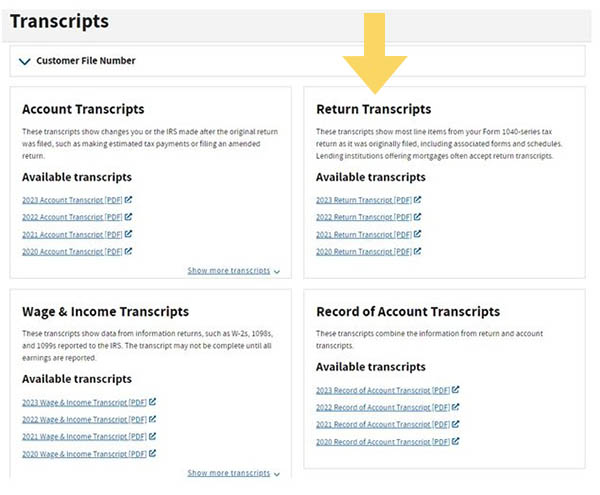
Select “Return Transcript” for 2024.
-
An “N/A” message could mean your taxes are still being processed. Continue checking periodically for the link. If it is not available by the deadlines to submit documents to SEAA, email the program at OpportunityScholarships@ncseaa.edu to request an extension.
Source: www.irs.gov
Everything You Need to Know to Help You Complete Income Verification
How to Complete Income Verification
IRS Resources

Frequently Asked Questions
The law that governs the Opportunity Scholarship program requires SEAA to verify a percentage of Opportunity Scholarship applications for income each year. If you are not notified about completing income verification, you do not need to go through this process.
If the IRS has not finished processing your tax returns and your deadline is approaching, you can email OpportunityScholarships@ncseaa.edu to request a deadline extension. Requests are reviewed on a case-by-case basis and are not guaranteed.
No. We can only accept an electronic version of your tax return transcript. Request the transcript at www.irs.gov/individuals/get-transcript.
You must submit a tax return transcript for every member of your household who filed a tax return last year.
Select “Get Transcript Online” and choose “Return Transcript” for the requested year. If you can’t access your transcript, see the following question, “Why do I get an N/A message?”
This could mean your taxes are still being processed by the IRS. Keep checking. The site updates as taxes are processed. If your transcript is not available by your deadline to submit documents, email us at OpportunityScholarships@ncseaa.edu to request an extension of time.
No. You do not need to upload the required files to each student’s record individually. Complete the Income Verification Worksheet for any one student in your household who was awarded the scholarship. The information will automatically be applied to all students listed on your account.
After you submit the Income Verification Worksheet, we will send a Non-Filer form or a Basic Necessities form to your MyPortal To-Do List. These are for households that reported no income or reported income but were not required to file taxes.
When you complete the Income Verification Worksheet select “yes” for “Did this person file a tax return?”. Then email OpportunityScholarships@ncseaa.edu to tell us that you filed for an extension of time. We will ask you to submit a copy of your Application for Automatic Extension of Time to file U.S. Individual Income Tax Return (Form 4868).
Action items on your To-Do list will be checked off once you submit documents.
If you made an error on an electronic form or uploaded the wrong document, email us at OpportunityScholarships@ncseaa.edu to request assistance. Please provide us with details about the error so we can assist you.